
During one of the Microsoft TechEd sessions I attended this past June in New Orleans, I learned a valuable tidbit of security information related to Active Directory. By default, every domain user in your active directory has the rights to add up to 10 machines to your domain. This seems absurd for those of us that have a tightly delegated environment however, certain circumstances warrant this feature. I won’t get into the circumstances in this post, just how to disable this default feature.
Open a command prompt on a domain controller and type adsiedit.msc. (In the example screenshots I will be using a Windows Server 2008 R2 domain controller)
Use the connection point “Default Naming Context” if it is not already selected by default. Right-Click on your domain’s root folder and select Properties
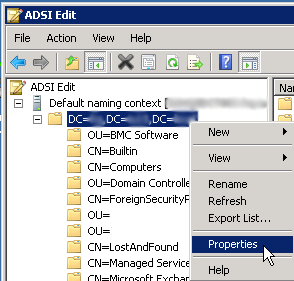
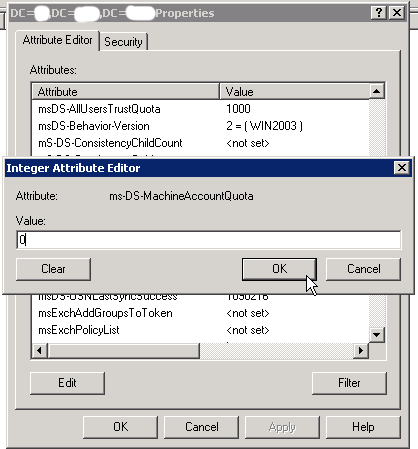
Scroll down the list of attributes until you find ms-DS-MachineAccountQuota. Click Edit to modify the value.

Change the value to 0 to disable regular users from having the rights to join machines to your domain.
*It’s important to note that you should be delegating only a particular set of users the ability to join machines to your domain. It is not best practice to use an account such as the domain administrator account to bind machines to the domain. Recommended best practice is to pre-stage the computer accounts in ADUC, then bind the machine using delegated privileges.

 Mike Shellenberger's blog
Leave a comment