

The next feature on my list officially moved into general availability on October 25, 2022 and that is the number match experience with Microsoft Authenticator. Push notifications leveraging the Microsoft Authenticator app are arguably the easiest and least user cumbersome method for performing multi-factor authentication with Azure Active Directory. A recent problem with push notifications has risen though and that is something the industry is coining as “MFA fatigue”.
As a user in a relatively secure computing environment, it’s likely you receive multiple MFA requests throughout the day. You will often receive push notifications while multitasking or you may be so used to acknoweldging and approving these requests that you don’t really pay attention to what’s triggering the request and simply appove them all. This is what bad actors are hoping for when they attempt to login as you with your compromised credentials. Using tactics such as sending the request at the beginning of your workday can trick individuals into blindly approving the request assuming whatever it was from it must be legit as you’ve just started up for the day.
Microsoft has released two new capabilities in Azure AD to address MFA fatigue. First up is number matching and changes the user experience when an MFA request is triggered. With number matching once a user enters their correct password during the authentication process, they will be shown a two-digit number on their screen. From the Microsoft Authenticator app side, instead of receiving a simple approve/deny request, the user will instead receive a prompt from the authenticator app asking for the two-digit code. Here’s what the sign in page and corrosponding notification in the authenticator app looks like for a number matching request:

Number matching is considered a passwordless MFA strength which is stronger than the typical push, SMS or OTP options that are more prone to MFA fatigue. As such, Microsoft has announced that starting February 27, 2023, number matching will automatically be enabled and enforced for users that are using push notifications with the Microsoft Authenticator app. I would highly suggest that organizations get in front of this now since the MFA experience will change and users will need to be notified of the new process for approving MFA requests with the authenticator app.
Enabling/enforcing number matching in the authenticator app for users is a simple configuration change in the authentication methods of Azure Active Directory. You’ll start in the Microsoft Entra admin center https://entra.microsoft.com then expand the Protect & Secure menu under Azure Active Directory. You’ll then choose Authentication Methods.
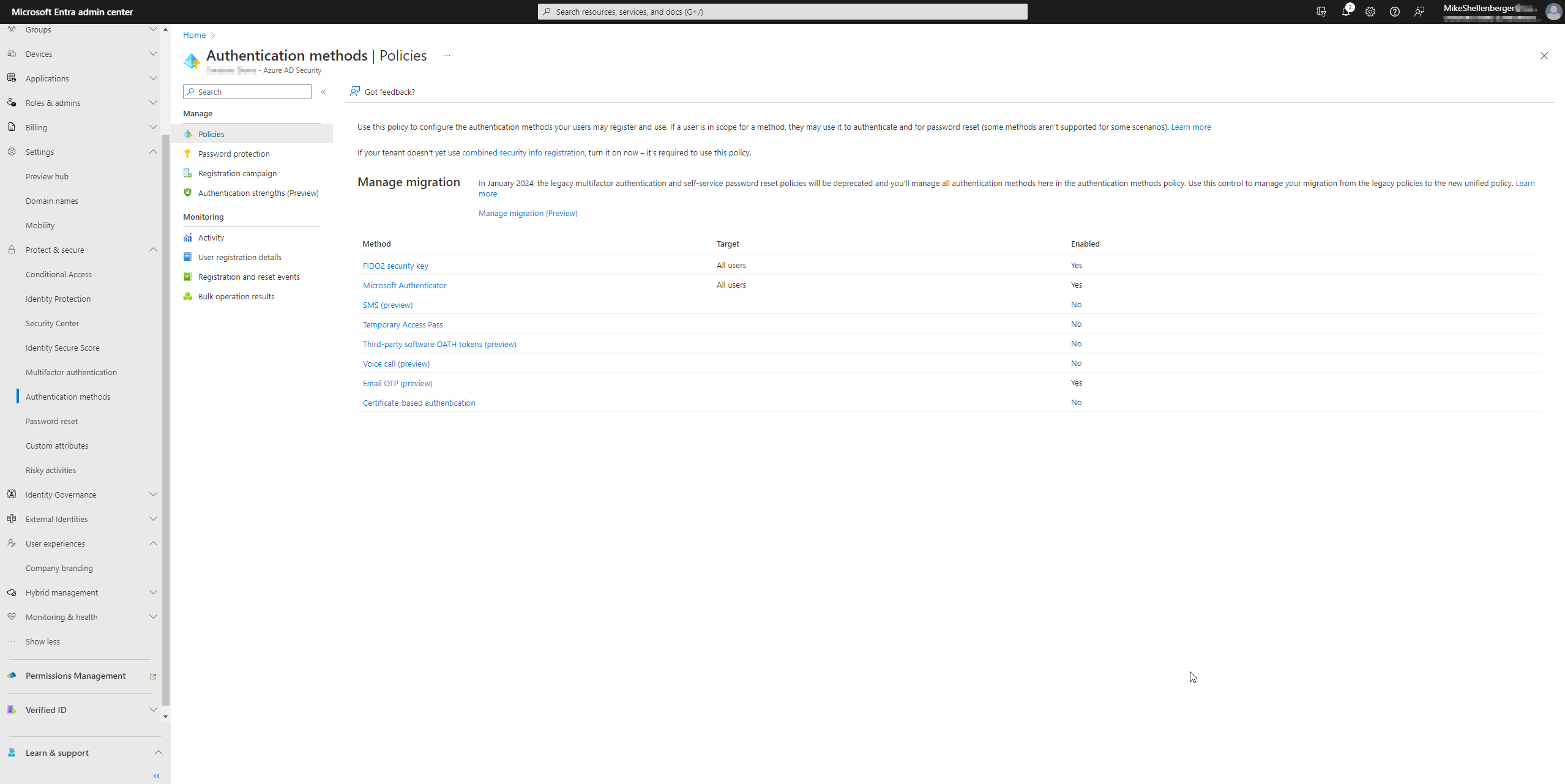
Click on Microsoft Authenticator, then click the Configure option when the Authenticator settings screen opens. You can either enable number matching for all users, or choose a security group to enable it for first if you’d like to roll the change out more gradually to users or have time to develop custom documentation for distribution. Choose your target and set the status to Enabled under Require number matching for push notifications. Your users will now start receiving the number match experience via Microsoft Authenticator.
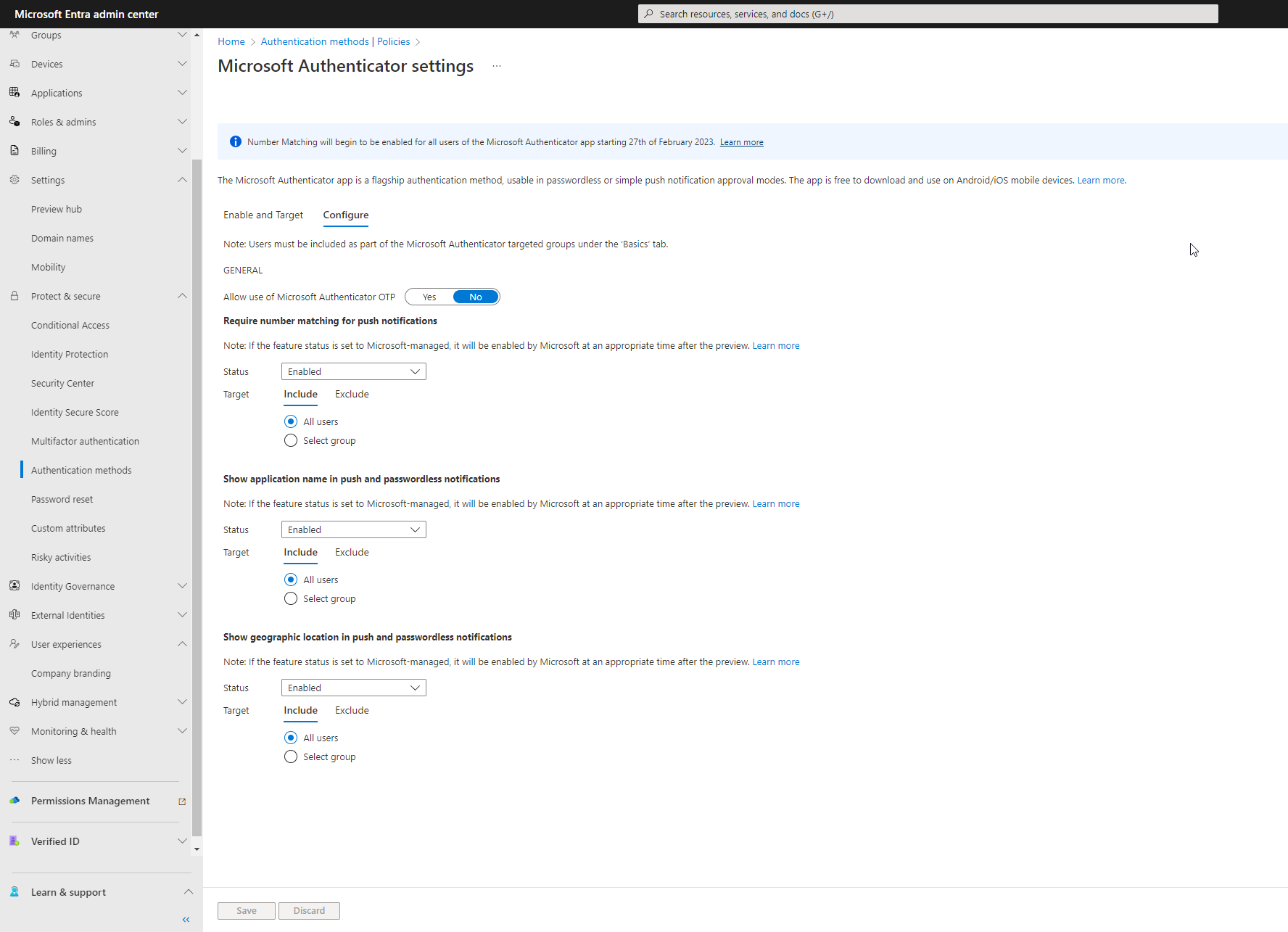
You may notice that there is also an option to Disable the number match experience. While it is possible to disable this feature at present, starting on February 27th, 2023, Microsoft will automatically enforce the number match experience for all users tenant-wide.
There is also an option to set the status to Microsoft Managed. Any settings in Microsoft Entra set to Microsoft Managed allows Microsoft to control when the feature is enabled or disabled in your tenant. Typically, annoucements for changes like this would be made to release notes or forums such as Tech Community so you really need to pay attention to stay ahead of any new changes that may impact your tenant. More information on Microsoft Managed settings can be found here. This might be a good option for organizations who don’t have dedicated security personnel and would rather trust Microsoft to ensure the environment is setup to recommended practices with the caveat that user experiences may change rapidly with little notice.
A couple of additional notes around the number match experience for those with more complex Azure MFA deployments. The number match experience is compatible with Active Directory Federated Services and the Azure MFA plug-in for Network Policy Servers however, you must be running the latest version of both to ensure a consistent end-user experience. If your RADIUS authentication method does not support number match or OTP, it is my understanding that the NPS plug-in will continue to fall back to a simple push notification, for now.
Another highly visible change to the Microsoft Authenticator app that will impact a lot of users, is the recent announcement that Microsoft will discontinue the companion authenticator app option for Apple watchOS with the January 2023 app update. Those of us who have grown accustomed to approving MFA requests on our watches will no longer have this option and we will need to acknowledge the requests via the iOS device with the Microsoft Authenticator app installed. This is due to the fact that there is no way to enforce the more secure number matching experience with watchOS, at present. This is a bummer, but is in the name of better security I suppose.
I hope this write up on the new number match experience has been helpful. I’m looking forward to the new number match experience in production along with some other recent changes I’ll be updating you on in part III of the series.
Are you finding the content on my site particularly helpful? Please consider donating to help me offset the costs of maintaining this site. Your support is greatly appreciated!

 Mike Shellenberger's blog
Leave a comment