
Microsoft has announced that starting in January 2024, the previous methods for configuring multifactor authentication (MFA) and self-service password reset (SSPR) authentication methods will be deprecated. Azure AD Authentication methods will be the new home for configuring all authentication methods. A migration process to migrate legacy SSPR/MFA auth methods to Azure AD authentication methods is under development and currently in public preview.
Let’s start by defining what exactly is meant by legacy methods for configuring SSPR and MFA authentication methods. Prior to Azure AD authentication methods (and conditional access based MFA), Office 365 MFA was configured purely via the “Windows Azure” based Azure AD portal. If your Office 365 tenant has been around for awhile, there is a good chance you still have configuration settings such as authentication methods for MFA defined here. To access the configuration, open the Microsoft Entra admin center and navigate to Users > All Users. You will find the link under the menu option for Per-user MFA.
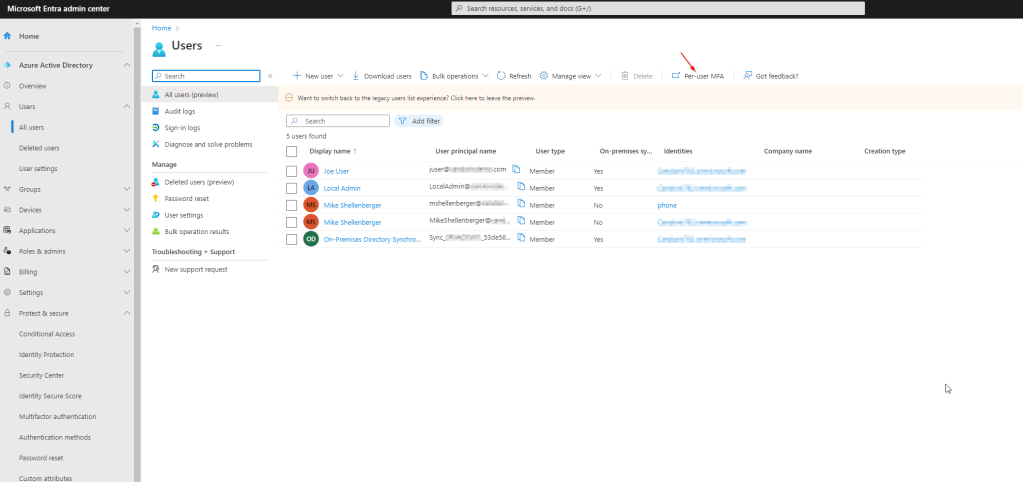
The legacy MFA configuration portal allows the enable/disable of select users for MFA. You can also configure the MFA service settings fom this portal, defining authentication methods, trusted ip’s, app passwords, etc. Any configuration in the verification options section of the configuration here is what we are most concerned with in regards to migration.

Next, let’s talk about the “legacy” self-service password reset authentication methods.
An extra point of clarity here. It’s the authentication method settings that are migrating from the self-service password reset and legacy MFA configuration. I don’t believe Microsoft is combining all the SSPR settings into Azure AD authentication methods at this point in time.
Self-service password reset configuration does not come from the legacy Windows Azure based MFA configuration, but rather the newer Azure AD portal. To configure what is now considered legacy SSPR authentication method settings, open the Microsoft Entra Admin Center and navigate to Protect & secure > Password reset. All configuration for SSPR is performed from here.

Notice if you click on the Authentication Methods link, you see a blue box at the top letting you know it’s now possible to manage the SSPR authentication methods in a single location under Azure AD authentication methods. That’s exactly what we are going to do here as part of the migration.
Now that we’ve addressed where to find the legacy setttings, let’s dig into how we go about consolidating and migrating MFA and SSPR authentication methods settings to Azure AD authentication methods. The first step is to document all legacy settings so we have a record of how everything is configured today, should a rollback be required. You will want to record your legacy MFA verification option settings, authentication method settings for SSPR, and any existing Azure AD authentication methods (Microsoft Entra Admin Center > Protect & secure > Authentication Methods) configured at present.
For the legacy MFA verification options the following table, provided by Microsoft, will help you in mapping to the new Azure AD authentication method options:
| Multifactor authentication policy | Authentication method policy |
| Call to phone | Voice calls |
| Test message to phone | SMS |
| Notification through mobile app | Microsoft Authenticator |
| Verification code from mobile app or hardware token | Third-party software OATH tokens Hardware OATH tokens (not yet available) Microsoft Authenticator |
For the legacy SSPR authentication options the following table, provided by Microsoft, will help you in mapping to the new Azure AD authentication method options:
| SSPR authentication methods | Authentication method policy |
| Mobile app notification | Microsoft Authenticator |
| Mobile app code | Microsoft Authenticator Software OATH tokens |
| Email OTP | |
| Mobile phone | Voice Calls SMS |
| Office phone | Voice Calls |
| Security questions | Not yet available, copy questions for later use |
The next step will be to initiate the settings migration. In the Azure AD Authentication methods configuration page (Microsoft Entra Admin Center > Protect & secure > Authentication Methods), select Manage migration (preview).

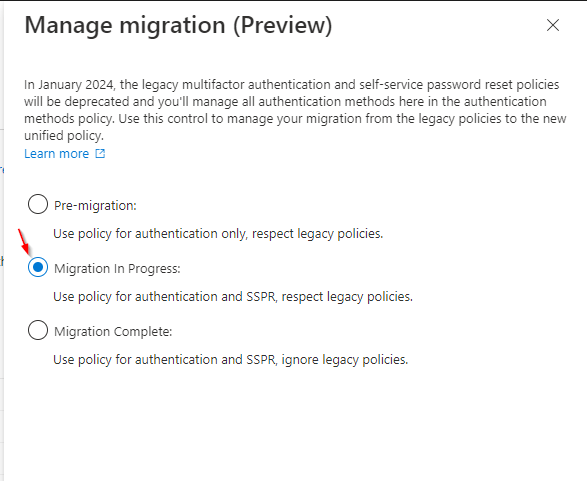
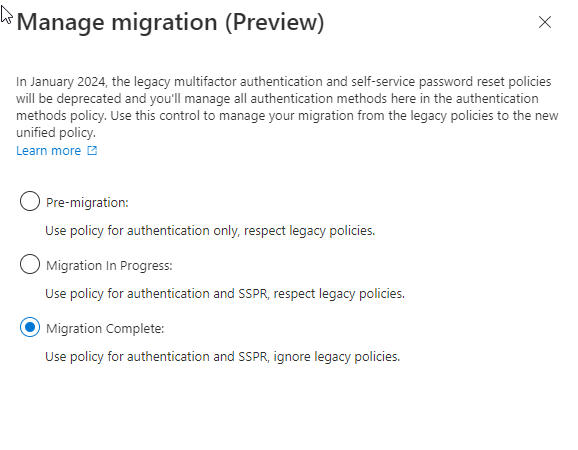
In the manage migration pane that opens, notice there are three “migration states” you can migrate between:
- Pre-migration: Azure AD Authentication methods policy is used for authentication. Legacy policy settings are still respected.
- Migration In Progress: Azure AD Authentication methods policy is used for authentication and SSPR. Legacy policy settings are still respected.
- Migration Complete: Only the Azure AD Authentication methods policy is used for authentication and SSPR. Legacy policy settings are ignored.
Unless you’ve made changes here already, the default migration state is Pre-migration. In this state, if you’ve configured any Azure AD authentication methods they will be honored for authentication purposes only. We will change our migration state to Migration In Progress at this point which tells Azure AD authentication methods in addition to authentication, the authentication methods enabled are now available for SSPR as well.
Now that we have Azure AD authentication methods working for both authentication and SSPR, we can begin migrating any legacy policy settings. Here’s where you’ll need to apply some thought – at least if your SSPR and MFA authentication method policies differ. Take a look at each legacy auth policy. If it is disabled for both MFA and SSPR, you can leave it disabled in Azure AD authentication methods. If it is enabled for both legacy MFA and SSPR, you will want to enable the authentication method in Azure AD auth methods.
Simple, right? It only starts to gets tricky if you have a specific authentication method enabled for SSPR or MFA only. Azure AD auth methods does not allow you to enable or disable an authentication method specifically for SSPR or MFA. If the Azure AD authentication method is enabled, it’s enabled for both SSPR and MFA. You will need to make a decision on whether or not to enable the authentication method for both SSPR and MFA moving forward, or eliminate it as an authentication method all together.
Azure AD authentication methods do allow you to target a specific group of users for an authentication method, so keep that in mind as a potential solution for allowing certain individuals the option to leverage specific authentication methods such as SMS and voice call. You can also exclude specific groups of users from a particular authentication method, as needed.
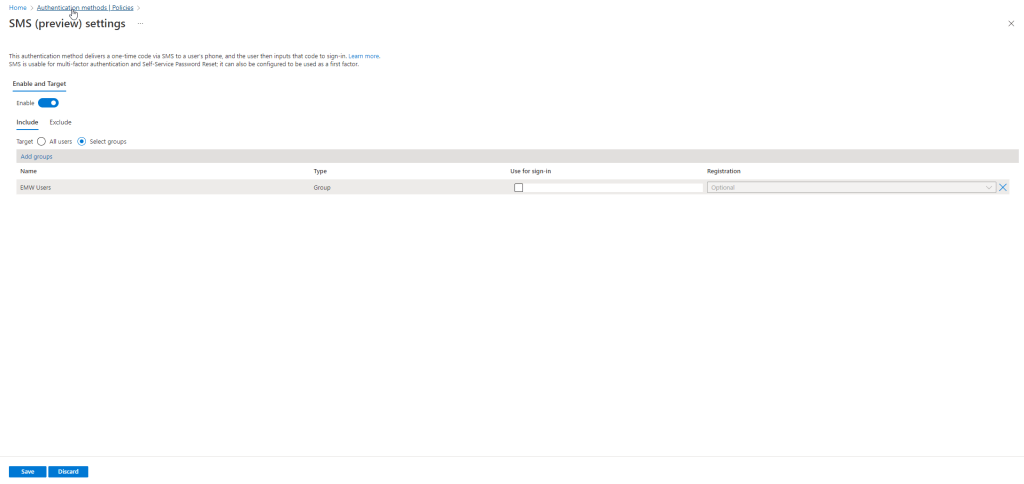
During your settings migration, as long as you are still in the Migration In Progress state, any legacy authentication methods will still be honored. This gives you time to test each authentication method as you migrate them and ensure the results you are looking for are delivered.
If you are currently leveraging the security questions authentication method for SSPR, this authentication method is not yet available in Azure AD authentication methods. You will need to choose to either migrate away from this authentication method entirely, or stay in the Pre-migration or Migration In Progress state until Microsoft releases this functionality (it is on the roadmap).
Also note that there are several new authentication methods available in Azure AD authentication methods that were not previously available in legacy SSPR or MFA. These include FIDO2 security keys, Temporary Access Pass, and Azure AD certificate-based authentication. This may be a great opportunity to introduce these more secure authentication technologies into your environment and migrate away from less secure, legacy authentication methods.
After you’ve configured all your Azure AD authentication methods to ensure the proper results for the environment, go back into the legacy SSPR and MFA authentication methods and remove each authentication method one-by-one. After each removal, be sure to test to make sure the new Azure AD authentication methods are behaving exactly as you intend for end users.
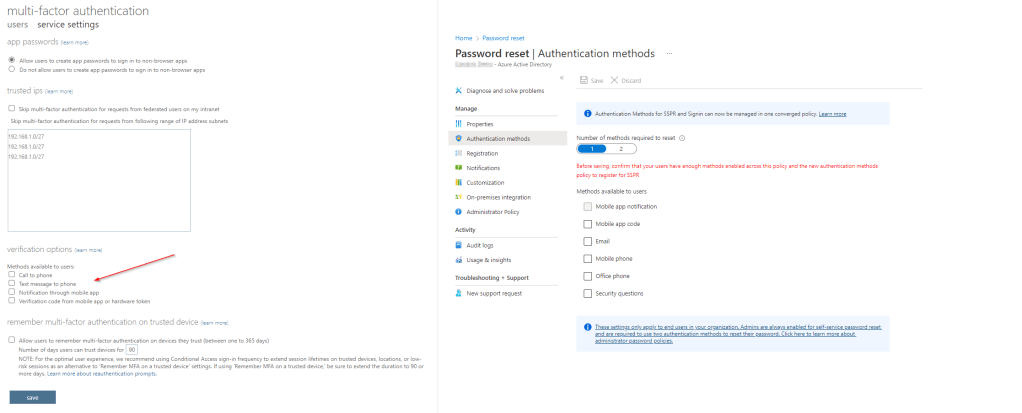
When all legacy authentication methods have been removed from SSPR and MFA you can modify your Azure AD authentication method migration state to Migration Complete.
It’s important to note that you can rollback the migration state at any time, so if you discover an issue post-migration you have options to reverse course. Assuming all is well, you’ve now successfully migrated your legacy SSPR and MFA authentication methods and you are ahead of the game for the January 2024 deadline from Microsoft! I hope you enjoyed this article. As always, please leave comments with any questions or thoughts you have around this topic.
Are you finding the content on my site particularly helpful? Please consider donating to help me offset the costs of maintaining this site. Your support is greatly appreciated!

 Mike Shellenberger's blog
Leave a comment